


guidance  Download / Print article PDF ##### ShareCopied to clipboard ##### Share##### Facebook##### Linkedin##### X##### Copy LinkCopied to clipboard ##### Share##### Facebook##### Linkedin##### X##### Copy LinkSmart devices: using them safely in your home=============================================Many everyday items are now connected to the internet: we explain how to use them safely. Invalid DateTime 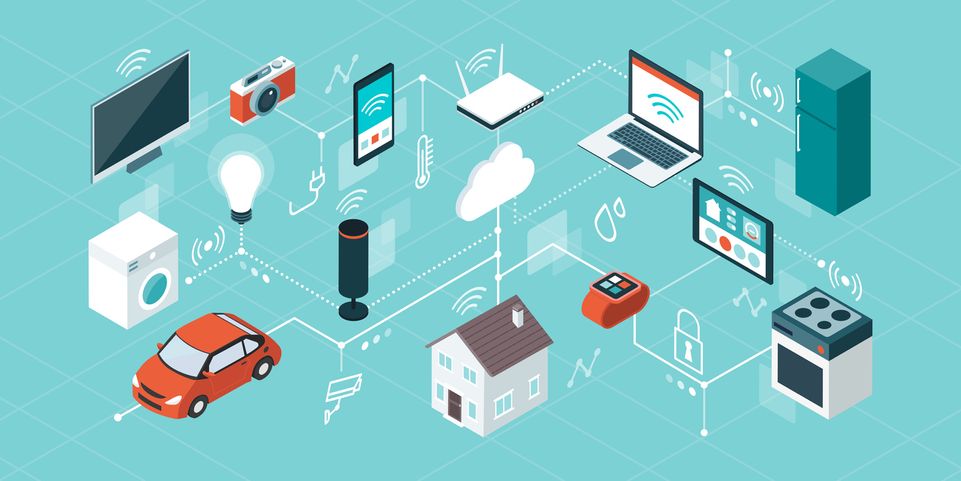 iStock.com/elenabs ##### On this page1. [Introduction](#section_1)2. [What is the risk from using Smart Devices?](#section_2)3. [Choosing your device](#section_3)4. [Check the default settings](#section_4)5. [Keeping your device updated](#section_5)6. [If something goes wrong](#section_6)7. [Getting rid of your device](#section_7)8. [Consumer advice](#section_8)Introduction————Smart devices are electrical items that connect to the internet (or to your home network), usually via wifi. They include ‘hi-tech’ devices (think smart speakers, fitness trackers and security cameras) and also standard household items (such as fridges, thermostats, kettles and washing machines).Unlike conventional electrical items, you can’t just switch on a smart device and forget it; you’ll need to check a few things before you start using it.**This page explains how to set up and manage your smart devices to keep your home – and your information – safe.** ### Note:For information about how to set up a *specific* device, refer to the manufacturer’s guidance. This may be a printed sheet or ‘getting started’ guide that came with the device, within the app itself, or on the manufacturer’s website (check their **Support** area first). *** ** * ** ***What is the risk from using Smart Devices?——————————————You’re probably used to keeping your phones, laptops or PCs up to date, so they’re safe to use.Similarly, manufacturers of smart devices need to release updates that fix bugs or security issues in their products which – if ignored – could put your data or privacy at risk. Without these fixes, your device becomes easier to hack.Your device is**not** secure if a criminal can guess the password used to access your smart device. This would allow them to log into your device, and use it to access your network, or to conduct cyber attacks.Some recent incidents involving smart devices are described in the following articles:* [Security gadgets ‘making people more vulnerable’ from hackers (BBC News)](https://www.bbc.co.uk/news/av/uk-england-beds-bucks-herts-49801267)* [Gadget-makers face ban on easy-to-guess passwords (BBC News)](https://www.bbc.co.uk/news/technology-53421658)* [Smart camera and baby monitor warning given by UK’s cyber-defender (BBC News)](https://www.bbc.co.uk/news/technology-51706631) *** ** * ** ***Choosing your device——————–Before you buy a smart device, check reviews of the product and the manufacturer. You should also check the minimum requirements needed to use and manage the device. You will almost certainly need: 1.  an internet connection2.  a smartphone/tablet3.  to install an app (or create an online account) to manage the device *** ** * ** ***You don’t need to buy the latest (or most expensive) smart device in order to be secure but, if possible, avoid buying devices that are no longer supported by the manufacturer, or whose support period will end soon. When out of support, smart devices are easier to hack, or may stop working altogether. Think of the support date as a ‘use by’ date for your device, so you’ll know how long it’s still safe to use. 1.  You can check online to see how long your specific device will be supported. Check the manufacturer’s website for details.2.  From 29 April 2024, new UK law means that **all** smart devices must meet basic cyber security requirements (which includes stating the product support end date). The consumer magazine Which? has produced a [comprehensive guide that describes what this law means for consumers](https://www.which.co.uk/news/article/new-security-laws-for-smart-devices-aGJO50M7C3jo).3.  The law also means manufacturers must ensure that devices are **not** shipped with default passwords, which can be easily shared online. *** ** * ** ***Check the default settings————————–Some devices might **not** be secure when they are first switched on, so you’ll need to take some quick steps to protect yourself. 1.  You should be asked to create a password for your smart device when you first set it up. If the device comes with a default password, change it.2.  Easily guessable passwords can be discovered by cyber criminals, so make sure you create a secure one, for example by [combining three random words.](/blog-post/three-random-words-or-thinkrandom-0)3.  If the device or app offers[](/guidance/setting-two-factor-authentication-2fa)[2-step verification (2SV)](/guidance/setting-two-factor-authentication-2fa), **turn it on** . 2SV (which is sometimes called multi-factor authentication or MFA) provides a way of ‘double checking’ that you really **are** the person you are claiming to be, and makes it much harder for criminals to access your devices, even if they know your password.4.  If you **don’t**need to access your smart device when you’re away from your home wifi, then switch off the ‘remote access’ functionality. *** ** * ** ***Keeping your device updated—————————Installing software updates promptly helps keep your devices secure. This will also often add new features, and keeps your device working as it should. For each of your smart devices, you should: 1.  switch on the option to install automatic updates (if available)2.  install any manual updates when prompted *** ** * ** ***If something goes wrong———————–If your device is not working properly, or if you’re worried it might be affected by a cyber incident (like the ones described above), visit the manufacturer’s website to see if there’s information available on what steps to take.If you think someone has taken control of a device in your home, you should reset it using instructions from the manufacturer’s website – [the NCSC have also produced guidance to help you do this.](/guidance/buying-selling-second-hand-devices#section_2) *** ** * ** ***Getting rid of your device————————–If you decide to sell, or give your device to someone else, you should first perform a **factory reset** . This will return the device to its original settings, and should also remove all your personal data from the device. Check your manufacturer’s website if you need to find out how to perform a reset, or refer to the NCSC’s guidance on [Buying and selling second-hand devices](/guidance/buying-selling-second-hand-devices). *** ** * ** ***Consumer advice—————The NCSC does**not** provide consumer advice. If you need information regarding your rights as a consumer, please refer to the following resources:* [Citizens Advice: Returning faulty goods](https://www.citizensadvice.org.uk/consumer/somethings-gone-wrong-with-a-purchase/return-faulty-goods/)* [Which? Consumer rights on smart devices](https://www.which.co.uk/consumer-rights/advice/what-are-my-rights-when-the-digital-element-of-my-smart-device-stops-working-am7eT8F4CmLf)* [GOV.UK: Product Security and Telecommunications Infrastructure (PSTI) Bill — product security factsheet](https://www.gov.uk/guidance/the-product-security-and-telecommunications-infrastructure-psti-bill-product-security-factsheet) *** ** * ** ***Downloads———[* pdf* 311 KB#### New security law for smart devices – April 2024Leaflet explaining why this new law is required and how it affects you – as a consumer.](https://www.ncsc.gov.uk/files/Security-law-smart-devices-NCSC.pdf) Topics——[Authentication](https://www.ncsc.gov.uk/section/advice-guidance/all-topics?topics=Authentication)[Devices](https://www.ncsc.gov.uk/section/advice-guidance/all-topics?topics=Devices)[Vulnerabilities](https://www.ncsc.gov.uk/section/advice-guidance/all-topics?topics=Vulnerabilities)[Internet of Things](https://www.ncsc.gov.uk/section/advice-guidance/all-topics?topics=Internet of Things)|  | Back to top |  | Download / Print article PDF || ##### Share|| Copied to clipboard || ##### Share|| || ##### Facebook|| || ##### Linkedin|| || ##### X|| || ##### Copy Link|| Copied to clipboard || ##### Share|| || ##### Facebook|| || ##### Linkedin|| || ##### X|| || ##### Copy Link|| * || ##### Published|| * 15 February 2019| *|| ##### Reviewed|| * 23 February 2024| *|| ##### Version|| * 2.0| *|| ##### Written For|| * [You -& your family](/section/advice-guidance/you-your-family)| * || ##### Published|| * 15 February 2019| *|| ##### Reviewed|| * 23 February 2024| *|| ##### Version|| * 2.0| *|| ##### Written For|* [You -& your family](/section/advice-guidance/you-your-family)  Back to top
Related Tags:
NAICS: 923 – Administration Of Human Resource Programs
NAICS: 519 – Web Search Portals
Libraries
Archives
Other Information Services
NAICS: 92 – Public Administration
NAICS: 33 – Manufacturing – Metal
Electronics And Other
NAICS: 51 – Information
Blog: NCSC Reports
Guidance and Blog-post
M1032 – Multi-factor Authentication
System Time Discovery
Clipboard Data
Associated Indicators: