

guidance  Download / Print article PDF ##### ShareCopied to clipboard ##### Share##### Facebook##### Linkedin##### X##### Copy LinkCopied to clipboard ##### Share##### Facebook##### Linkedin##### X##### Copy LinkScam ‘missed parcel’ SMS messages: advice on avoiding malware=============================================================How to avoid malware sent using scam ‘missed parcel’ SMS messages, and what to do if your phone is already infected. Invalid DateTime 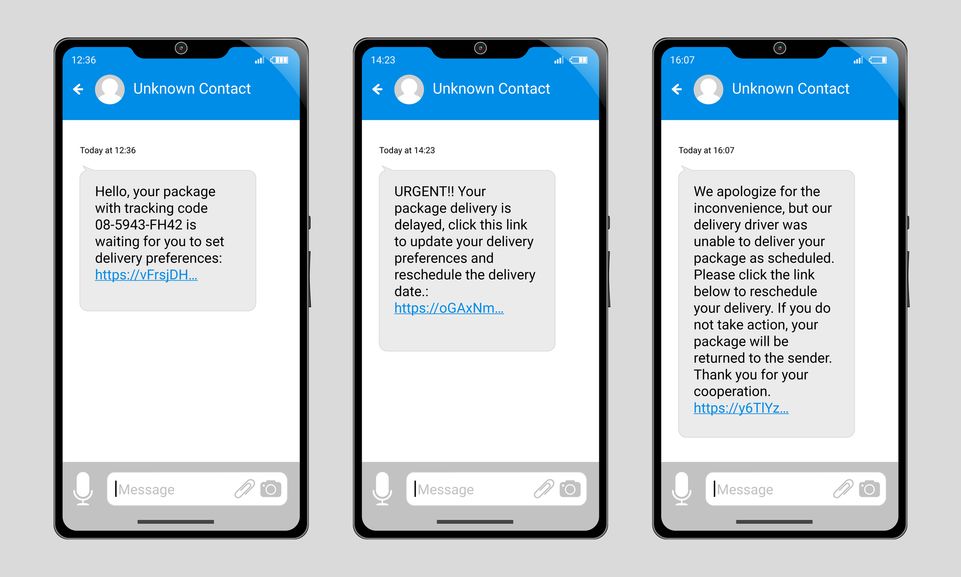 iStock.com/synthetick Cyber criminals are tricking UK citizens into downloading **mali** cious soft**ware** (known as malware) by sending scam ‘missed parcel’ SMS messages. Around the festive period, this type of cyber scam is even more prevalent, as many of us will be expecting deliveries.The scam SMS messages contain links to what appear to be ‘official’ delivery/parcel-tracking apps, which you’re encouraged to install. But the ‘app’ is in fact a type of malware. If installed, this malware can steal your banking details, passwords, and other sensitive information.The malware will also attempt to access your contact list, and send scam SMS messages to these numbers as well, helping the malware to spread across the world.This guidance explains:* [what to do if you think you’ve already installed the malware](#section_1)* [how to *safely* check if you’ve any missed parcels](#section_2)* [how to report suspicious-looking messages](#section_3)* [how to protect yourself from future scams](#section_4)We also provide some more details [about how this type of malware works](#section_5).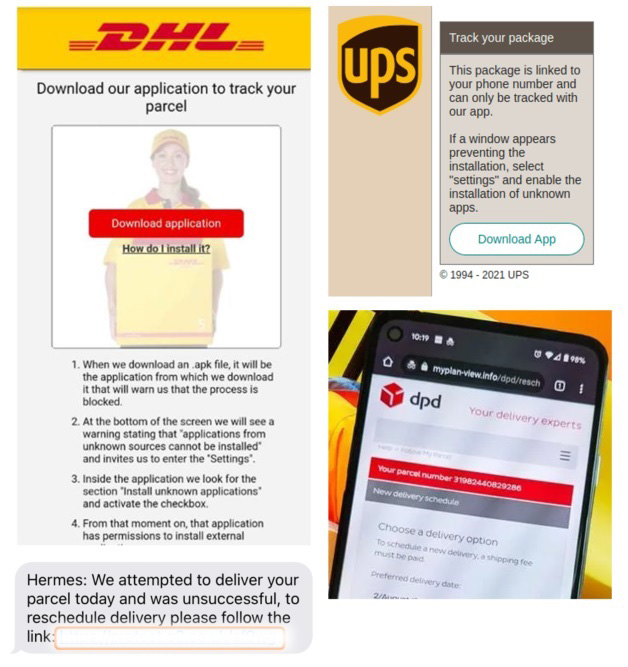##### Examples of scam websites and messages, which contain links to malware disguised as tracking apps.*** ** * ** ***If you think you have installed malware—————————————It can be hard to tell if your device has malware on it. However, if you think you may have been tricked into installing malware from a scam message, then it’s important that you **don’t** log into any accounts, as the malware may steal these details. Instead, as soon as you can, you should perform a factory reset on your device. ### Note:It’s important that you **don’t** back up your data before you perform a factory reset, as the backup will also contain the malware. For the same reason, when you’re given the option to restore backups, you should only do so if you’re confident that the backup was created **before you installed the malware** . If you can’t be sure, you should perform a factory reset and **not** restore any backups. Performing a factory reset————————–On most phones, you can perform a ‘factory reset’ on your phone by accessing the **Settings**. Refer to the device manufacturer’s website for specific details (it may be referred to as ‘Erase all content’). The reset will remove all your personal data from your device (including messages, contacts, photographs, browsing history, wifi codes, passwords, and any apps you’ve installed).You may need to enter a password when you reset your device. If this is the case, make sure you change this password.Updating your passwords———————–If you have logged into any accounts or apps since installing the malware, you must change the password for that account (as it may have been stolen). If you’ve used that *same* password for any *other* accounts, you also need to update those passwords (and make sure they are unique).* Remembering lots of passwords is difficult. [So consider using a password manager](/collection/top-tips-for-staying-secure-online/password-managers).* Whilst updating your passwords, [set up two-step verification (2SV)](/collection/top-tips-for-staying-secure-online/activate-2-step-verification-on-your-email) on accounts, where possible.* If you need help on creating strong passwords, refer to our [Cyber Aware advice on using 3 random words](/collection/top-tips-for-staying-secure-online/three-random-words). *** ** * ** ***How to safely check for missed parcels————————————–Even if you are expecting a parcel, a safer way of tracking its status is to use the **official website** of the delivery companies. We’ve listed the major delivery company websites below.* **DHL** Track a Parcel ()* **DPD** Track It ()* **Evri** Track Your Parcel ()* **FedEx** Tracking ()* **Royal Mail** Track your item ()* **UPS** Track ([https://www.ups.com/track?loc=en_GB-&requester=ST/](https://www.ups.com/track?loc=en_GB&requester=ST/))* **Whist** l Parcel Tracking ()* **Yodel** Track your parcel () Alternatively, you can use the delivery company’s official app for tracking deliveries. Only download these from an official app store (such as [Google Play](https://play.google.com/store/games?hl=en&gl=US), the [Apple App Store](https://www.apple.com/uk/app-store/), or the [Samsung Galaxy Store](https://www.samsung.com/uk/apps/galaxy-store/)). *** ** * ** ***How to report suspicious-looking messages—————————————–If you receive a ‘missed parcel’ message that looks suspicious, you can report it to your mobile operator. This costs nothing, and can reduce the amount of scam texts you receive (whilst helping to protect others from cyber crime). *** ** * ** ***To report a scam message:————————-1. 1 Do **not** click the link in the message, and do **not** install any apps if prompted.2. 2 Forward the message to **7726**, a free spam-reporting service provided by phone operators. There are instructions on how to do this on our [‘Report a scam text’ page](/collection/phishing-scams/report-scam-text-message).3. 3 Once reported, you can**Delete**the message. *** ** * ** ***How to protect yourself from future scams—————————————–There are a number of things you can do to reduce the likelihood of your phone being infected with malware. 1.  Ensure your device is kept up to date by [installing the latest software and patches](/collection/top-tips-for-staying-secure-online/install-the-latest-software-and-app-updates).2.  Only install apps from official app stores such as [Google Play](https://play.google.com/store/games?hl=en&gl=US), the [Apple App Store](https://www.apple.com/uk/app-store/), or the [Samsung Galaxy Store](https://www.samsung.com/uk/apps/galaxy-store/).3.  For Android devices, make sure that [Google’s Play Protect service](https://support.google.com/android/answer/2812853) is enabled. Some Huawei devices provide a [similar tool to scan devices for viruses](https://consumer.huawei.com/en/support/content/en-us00317497/). This will ensure that any malware on your device can be detected and removed.4.  [Set up two-step verification (2SV)](/collection/top-tips-for-staying-secure-online/activate-2-step-verification-on-your-email) wherever possible, particularly on your most important accounts. *** ** * ** ***What is ‘banking trojan’ malware——————————–The type of malware described on this page is known as a ‘banking trojan’. The most notorious of these is called [FluBot, as described in this BBC Technology article](https://www.bbc.co.uk/news/technology-56859091). The scam works because users believe they are installing ‘official’ versions of apps on their phones. In fact, they are being tricked into unwittingly installing malware that secretly monitors their online activity, and steals passwords (and other personal details). This stolen information can be used to commit online crime, including financial crime.If you encounter a suspicious website that you think contains malware, of any kind, you can [report this directly to the NCSC](/section/about-this-website/report-scam-website). You can also report suspicious emails by forwarding them to **[report@phishing.gov.uk](mailto:report@phishing.gov.uk)** as part of the NCSC’s [Suspicious Email Reporting Service (SERS)](/information/report-suspicious-emails). Topics——[Devices](https://www.ncsc.gov.uk/section/advice-guidance/all-topics?topics=Devices)[Malware](https://www.ncsc.gov.uk/section/advice-guidance/all-topics?topics=Malware)|  | Back to top |  | Download / Print article PDF || ##### Share|| Copied to clipboard || ##### Share|| || ##### Facebook|| || ##### Linkedin|| || ##### X|| || ##### Copy Link|| Copied to clipboard || ##### Share|| || ##### Facebook|| || ##### Linkedin|| || ##### X|| || ##### Copy Link|| * || ##### Published|| * 23 April 2021| *|| ##### Reviewed|| * 15 December 2023| *|| ##### Version|| * 3.0| *|| ##### Written For|| * [You -& your family](/section/advice-guidance/you-your-family)| * [Self employed -& sole traders](/section/advice-guidance/self-employed-sole-traders)| * || ##### Published|| * 23 April 2021| *|| ##### Reviewed|| * 15 December 2023| *|| ##### Version|| * 3.0| *|| ##### Written For|| * [You -& your family](/section/advice-guidance/you-your-family)* [Self employed -& sole traders](/section/advice-guidance/self-employed-sole-traders)  Back to top
Related Tags:
Play
NAICS: 484 – Truck Transportation
NAICS: 48 – Transportation
NAICS: 481 – Air Transportation
NAICS: 92 – Public Administration
NAICS: 516 – Broadcasting And Content Providers
NAICS: 51 – Information
NAICS: 924 – Administration Of Environmental Quality Programs
Blog: NCSC Reports
Guidance and Blog-post
Associated Indicators:
null